Trezor is one of the safest ways to hold crypto, which is exactly why scammers target the people who use it. They can’t break the hardware, so instead they go after the human behind it, with convincing emails, fake websites, and even counterfeit devices. Almost every Trezor scam has the same goal: to trick you into revealing your recovery seed, because whoever has your seed controls your funds.
This guide breaks down the most common Trezor scams, including fake breach emails, the “authentication check” phishing angle, and counterfeit hardware, so you can recognise the red flags and keep your crypto safe.
Why Trezor Users Are a Target
A hardware wallet keeps your private keys offline, out of reach of malware and remote hackers. That protection is real, and it’s why brute-forcing a Trezor or extracting keys from the chip isn’t realistic for attackers.
So scammers change tactics. Instead of attacking the device, they attack your trust. If they can convince you to type your 12, 20, or 24-word seed into a website, or to buy a device they’ve already tampered with, they don’t need to hack anything. You hand them the keys yourself. Understanding that single fact, that the seed is always the real target, makes almost every Trezor scam easy to spot.
Trezor Scam Emails: Fake Breaches and “Authentication Check” Messages
The most common Trezor scam arrives in your inbox. These emails are designed to create panic and urgency so you act before you think.
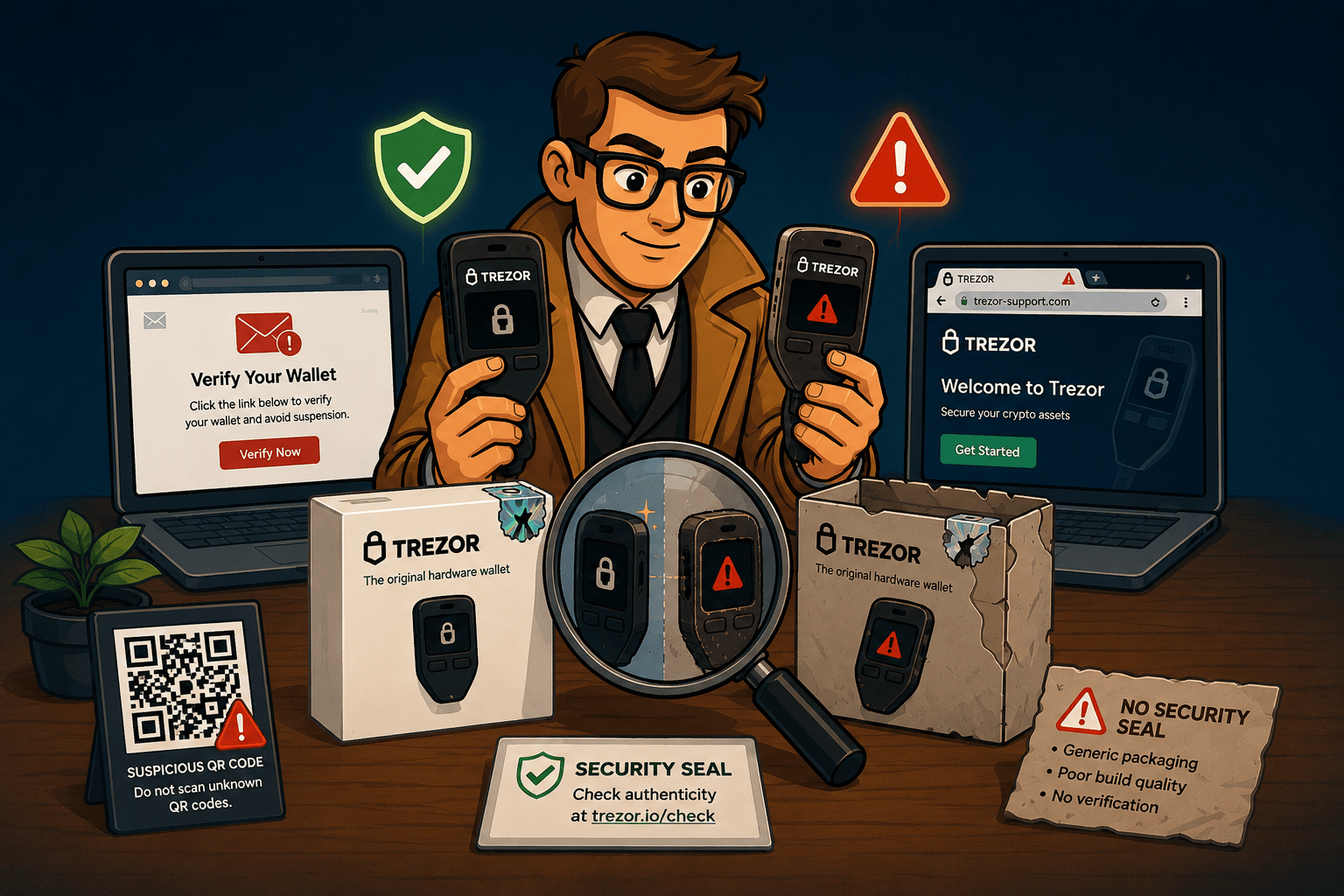
A widely reported example is the fake data breach email. Victims received a message claiming Trezor had suffered a security incident affecting a specific number of customers, urging them to download the “latest Trezor Suite” and set a new PIN. The download link led to a spoofed website that looked identical to the real thing, sometimes using Punycode tricks so the address appeared to read suite.trezor.com when it was actually a different domain in disguise. Anyone who connected their wallet and entered their recovery seed handed it straight to the attackers. In some cases, scammers even abused Trezor’s own contact form to make the messages look more legitimate.
The “authentication check” or “wallet verification” angle is a close cousin. Here the email or pop-up claims your wallet must complete an urgent security check, authentication, or validation, or it will be locked or lose access. The “check” always ends the same way: it asks you to enter or confirm your recovery seed. No real authentication process ever needs your seed phrase.
There’s even an offline version. Scammers have mailed physical letters, made to look official, telling Trezor owners to scan a QR code and “revalidate” their wallet by entering their seed. The channel changes, the trick does not.
How to spot a Trezor scam email:
- Trezor’s only official website is trezor.io. It is not trezor.com, and not any look-alike with extra characters or hyphens.
- Trezor will never email, message, or write to you asking for your recovery seed, PIN, or passphrase. Ever.
- Genuine breach or security news is published on trezor.io, so type the address yourself instead of clicking a link in an email.
- Urgency is the tell. “Act now or lose access” is pressure, not procedure.
Fake Trezor Devices: Counterfeit and Tampered Hardware
The scariest scams involve the hardware itself. Security researchers at Kaspersky analysed a counterfeit Trezor Model T that looked genuine from the outside, holographic seals included, but was rebuilt inside to steal funds.
Instead of the ultrasonic welding used on real devices, the fake was held together with glue and tape. Its microcontroller had been swapped for one with the security read-out protection disabled. Most damning of all, the firmware didn’t generate a fresh, random recovery seed. It secretly used one of a small set of pre-generated seeds the attackers already had. The victim’s funds could then be drained even if the device was never used online, because the criminals held the keys from the very first moment.
Red flags of a fake or tampered Trezor:
- The device arrives with a recovery seed already filled in, or a card telling you to use a specific seed or PIN. A genuine Trezor always generates a brand-new seed that only you see, during your own setup.
- Packaging that looks resealed, glued, or damaged, or holographic seals that seem off.
- Setup instructions that skip the official trezor.io/start process, or that push you to a different app or website.
- Firmware authenticity warnings during setup, which you should never ignore.
How to buy a Trezor safely:
- Buy only from Trezor’s official shop or an authorised reseller listed on trezor.io. Avoid marketplaces, auction sites, and third-party “deals.”
- Set the device up yourself, from scratch, following trezor.io/start.
- Make sure the device generates your seed in front of you, and that you write it down yourself.
Other Trezor Scams Worth Knowing
Beyond emails and fake devices, a few more patterns come up again and again:
- Fake support. Scammers pose as “Trezor Support” on social media, chat pop-ups, or phone lines, then ask for your seed to “fix” an issue. Real support never needs it. If your device is locked because you forgot your PIN, the fix is your own seed, not a support agent’s help with it.
- Fake wallet apps. Malicious apps in app stores or browser extensions mimic Trezor Suite and capture whatever you type. Only use software linked from trezor.io.
- Giveaways and airdrops. “Send 0.1 BTC to receive 0.2 back,” or a token airdrop that asks you to connect and reveal your seed. Both are theft.
- Fake recovery services. Some scammers pose as crypto recovery firms and ask for your seed or a large upfront payment. A legitimate service never asks for your full seed upfront and never guarantees results.
The Golden Rules to Avoid Every Trezor Scam
Almost every Trezor scam fails against a short checklist:
- Never type or share your recovery seed anywhere except directly on your own Trezor device during setup or recovery. Not on a website, not in an app, not with any person.
- Only trust trezor.io. Type it yourself, and buy hardware only from official channels.
- A genuine new device is never pre-loaded with a seed or PIN.
- Trezor never contacts you to ask for your seed, PIN, or passphrase.
- Slow down. Scams run on urgency, so a claim that you must act immediately is a reason to pause, not to rush.
For a broader rundown of safe recovery habits, our Trezor wallet recovery guide covers the same security rules in the context of restoring a wallet.
Think You’ve Been Scammed? What to Do Now
If you’ve just realised something is wrong, act quickly but carefully.
If you entered your seed on a suspicious site or device and you still have access, assume the wallet is compromised and move your funds immediately. Set up a fresh wallet on a genuine device with a brand-new seed, and transfer everything to it before the attacker does. If you only clicked a link but did not enter your seed, you’re most likely fine, but change habits and verify everything through trezor.io from now on.
Here is the honest part. If a scammer already has your seed and has moved your funds, the blockchain is irreversible, and no service, including ours, can claw those coins back. Be very wary of anyone who promises to “reverse” a theft or recover stolen funds for a fee, because that is often a second scam targeting people who were just victimised.
Where a legitimate recovery service genuinely helps is a different problem: regaining access to your own wallet when you’ve lost a seed word, forgotten your passphrase, or can’t get past a PIN. If that’s your situation, you can get an honest assessment through our Trezor recovery service, and we’ll tell you upfront what is and isn’t possible.
Scam tactics change constantly, so when in doubt, stop and verify directly on trezor.io before doing anything with your wallet.
Trezor Scam FAQ
Does Trezor send emails about a data breach asking me to update?
Be extremely cautious. Scammers have sent fake breach emails urging users to “update” or set a new PIN through a spoofed site. Trezor publishes real security news on trezor.io, and never asks for your recovery seed. If you get such an email, don’t click anything and verify directly on trezor.io.
Is the “Trezor authentication check” email real?
No. Any email, pop-up, or letter asking you to complete an “authentication check,” verification, or validation by entering your recovery seed is a phishing scam. Genuine wallet access never requires you to type your seed into a website or app.
How do I know if my Trezor is genuine?
Buy only from trezor.io or an authorised reseller, check that packaging and seals are intact, and set it up yourself via trezor.io/start. A real device generates a new recovery seed in front of you. If it arrives with a seed or PIN already set, it’s fake, so do not use it.
Trezor asked for my recovery seed. Is that normal?
Only your own physical device asks you to enter your seed, and only during setup or recovery. If a website, app, email, or “support agent” asks for it, it’s a scam. Stop immediately.
Can I recover crypto stolen through a Trezor scam?
Usually not. Blockchain transactions can’t be reversed, so once a scammer moves your funds, they’re gone. Anyone guaranteeing to recover stolen coins for an upfront fee is almost certainly running another scam. Recovery services can only help you regain access to your own wallet, not undo a theft.